Back to Blog
Reporting 30 May 2026 By Onzup Team

Employee Audit Software Reports: What Evidence Should Managers Keep?

Learn what employee audit software should capture for internal reviews, client escalations, HR governance, and compliance-ready reporting.

Employee Audit Software Employee Audit Management Software Audit Ready Reports Compliance Reporting
Employee Audit Software Reports: What Evidence Should Managers Keep?

Employee audit software should help a team produce clear evidence quickly. That evidence needs to be readable by managers, HR, leadership, and sometimes client-facing teams.

What evidence matters

Useful employee audit reports usually include:

  • Screenshot trails with timeline context
  • App and website usage records
  • Active and idle time trends
  • Alerts or exceptions
  • Productivity summaries by team or device
  • Export-ready reports for review meetings

The goal is not to collect endless data. The goal is to preserve enough context to understand what happened and why it matters.

Common audit situations

Internal audits often happen after a missed deadline, productivity concern, client escalation, or policy review. Without a structured report, managers end up reconstructing evidence from screenshots, chat messages, spreadsheets, and memory.

That slows decisions and weakens accountability.

How Onzup EPS supports audit workflows

Onzup EPS gives teams employee audit software capabilities through screenshots, activity records, app and website tracking, idle-time data, alerts, and PDF-ready productivity reports.

For firms that need repeatable governance, these reports turn daily activity into evidence that can support manager reviews, HR conversations, and client accountability.
Onzup Team avatar

Author bio

Onzup Team

Editorial Team

Onzup writes from the perspective of product, operations, and implementation teams that work on productivity visibility, reporting, and governance across office, remote, and branch environments.

View author profile

Last updated 30 May 2026

Implementation notes

How this article was shaped

  • Tie every claim to a real product capability or a documented workflow pattern.
  • Use role, industry, and location context to avoid generic templated copy.
  • Prefer concrete examples, reporting outputs, and rollout notes over abstract promises.

Methodology

Editorial methodology

Each article should connect a search query to a real operating question, then answer it with product-aligned language, implementation guidance, and practical examples.

The goal is to help readers understand not just what EPS does, but how the software fits into a review rhythm, policy framework, or reporting workflow.

Workflow examples

Practical workflow examples

01

Weekly manager review

Review trend changes, outliers, and follow-up actions in a predictable cadence.

02

Role-based coaching

Use objective signals to guide conversations with managers, leads, or branch owners.

03

Leadership summary

Convert raw activity data into concise, decision-ready reporting for leadership review.

Screenshot evidence

Relevant EPS screenshots

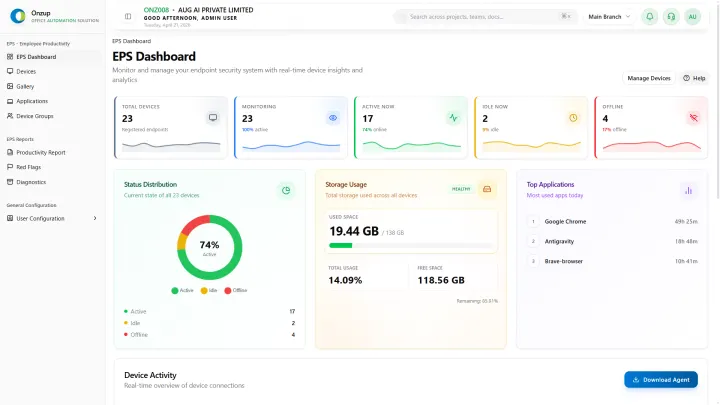
Onzup EPS dashboard preview
Dashboard views make it easier to review activity, alerts, and productivity signals in one place.
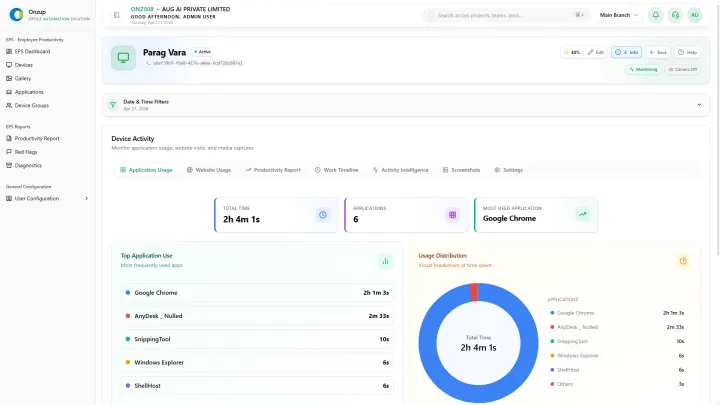
Onzup EPS app usage preview
Usage context helps managers understand what work tools are actually being used during work hours.
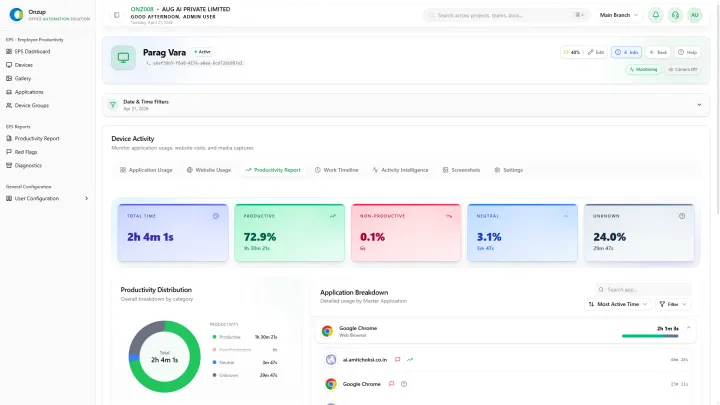
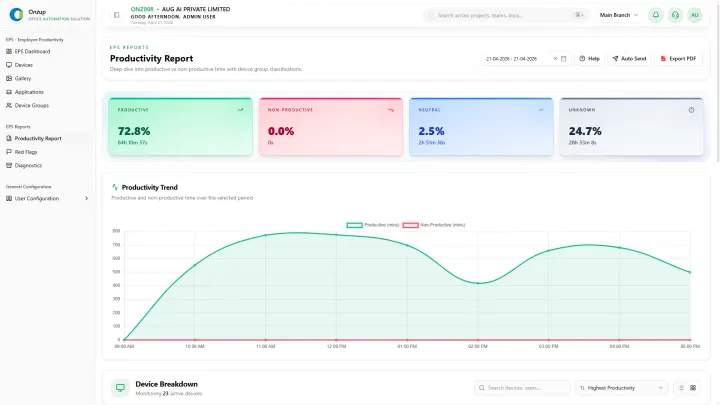
Onzup EPS productivity report preview
Export-ready reports support weekly review and governance conversations.

Customer proof

Customer proof and operational value

Weekly review cadence

1 dashboard

Managers can review productivity patterns without manually stitching together reports.

Operational context

Activity + screenshots

Reporting becomes easier to interpret when proof and trend data sit together.

Governance readiness

Exportable outputs

Leadership can use the same data for review, coaching, and escalation conversations.

FAQ

Questions readers ask before they convert

Q How does Onzup handle employee audit software reports: what evidence should managers keep??

The content should explain the topic through actual product workflows, not generic promises or empty category claims.

Q Can this support weekly reviews and escalation?

Yes. The pages should connect the product to reporting, review cadence, and action-oriented workflows.

Continue researching practical EPS topics.

Back to top
WhatsApp chat