

As a project manager, are you facing this?
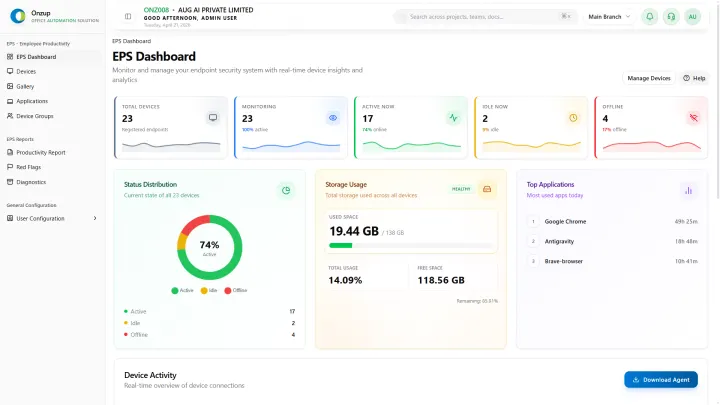
EPS helps project managers turn execution signals into earlier risk detection and more confident milestone tracking.
How EPS Solves This
EPS provides practical visibility layers that teams can operationalize quickly:
- Provides evidence-backed context for project status reviews.
- Identifies output drift before milestone delays.
- Supports cross-functional follow-up with measurable signals.
Benefits And Outcomes
- Improved project governance quality
- Earlier milestone risk visibility
- Cleaner stakeholder reporting
- Higher on-time delivery confidence
- Reduced last-minute escalations
- Stronger execution alignment across teams
Recently updated
Implementation notes
Implementation guidance for this solution
- Tie every claim to a real product capability or a documented workflow pattern.
- Use role, industry, and location context to avoid generic templated copy.
- Prefer concrete examples, reporting outputs, and rollout notes over abstract promises.
Workflow examples
Workflow examples for this solution
01
Weekly manager review
Review trend changes, outliers, and follow-up actions in a predictable cadence.
02
Role-based coaching
Use objective signals to guide conversations with managers, leads, or branch owners.
03
Leadership summary
Convert raw activity data into concise, decision-ready reporting for leadership review.
Customer proof
Why teams choose this setup
Weekly review cadence
1 dashboard
Managers can review productivity patterns without manually stitching together reports.
Operational context
Activity + screenshots
Reporting becomes easier to interpret when proof and trend data sit together.
Governance readiness
Exportable outputs
Leadership can use the same data for review, coaching, and escalation conversations.
FAQ
Frequently asked questions
Q Can EPS support sprint and milestone reviews?
Yes. It provides practical trend signals for both.
Q Does this replace PM tools?
No. It complements them with deeper execution intelligence.
Internal links
Move from the solution page to the next layer of depth
The link rail keeps each solution page attached to a pillar, a supporting cluster, and a practical implementation article.
Pillar
productivity visibility
Use the productivity pillar when the page needs clearer performance and output framing.
Explore this pageSupporting cluster
remote work governance
Adds the remote-work implementation layer behind distributed teams.
Explore this pageImplementation article
how to track employee productivity without micromanaging your team
A practical article that explains how to implement the topic in real operations.
Explore this pageNext Step
See how this setup maps to your team structure, workflows, and reporting needs.