Back to Blog
IT Companies 13 May 2026 By Onzup Team

Employee Monitoring for IT Companies: Balancing Visibility and Trust

Explore how IT companies can use employee monitoring to improve accountability, support hybrid teams, and avoid the trust issues caused by poor monitoring practices.

Employee Monitoring For IT Companies Developer Productivity Visibility Hybrid Team Monitoring
Employee Monitoring for IT Companies: Balancing Visibility and Trust

IT companies need better visibility than timesheets can provide, but they also need to avoid turning monitoring into a culture problem.

Why the usual tools fall short

Simple tracker tools often overvalue visible activity and undervalue focused technical work. That creates bad signals, especially in engineering, QA, support, and implementation teams.

What IT teams actually need

A stronger monitoring approach for IT companies should include:

  • Device status visibility
  • App and website usage intelligence
  • Activity scoring for trend analysis
  • Alerts for unusual or risky patterns
  • Reports for team leads and operations managers

This gives leadership a clearer operating picture without asking every manager to manually investigate people all day.

Trust depends on how the system is used

The tool matters, but operating policy matters just as much. Teams respond better when monitoring is framed around accountability, workflow clarity, and performance support rather than suspicion.

Why reporting matters

IT companies often work in fast-moving, distributed environments. Leadership needs reports that show what happened across teams without forcing them to stitch together multiple data sources.

Where EPS fits

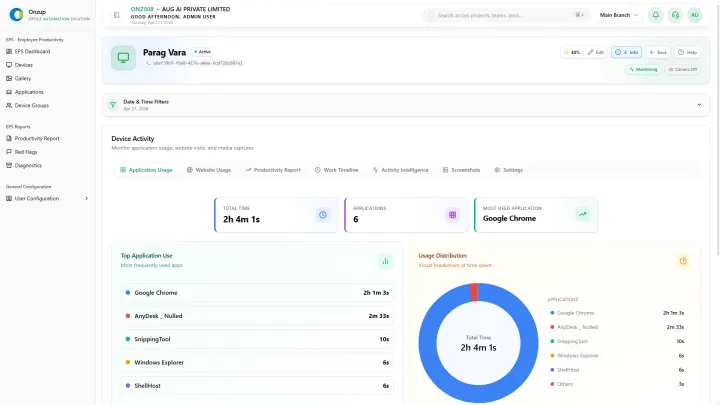
Onzup EPS gives IT companies a visibility layer across activity, apps, screenshots, alerts, and analytics. That helps team leads review patterns quickly while keeping the process more structured and less reactive.
Onzup Team avatar

Author bio

Onzup Team

Editorial Team

Onzup writes from the perspective of product, operations, and implementation teams that work on productivity visibility, reporting, and governance across office, remote, and branch environments.

View author profile

Last updated 13 May 2026

Implementation notes

How this article was shaped

  • Tie every claim to a real product capability or a documented workflow pattern.
  • Use role, industry, and location context to avoid generic templated copy.
  • Prefer concrete examples, reporting outputs, and rollout notes over abstract promises.

Methodology

Editorial methodology

Each article should connect a search query to a real operating question, then answer it with product-aligned language, implementation guidance, and practical examples.

The goal is to help readers understand not just what EPS does, but how the software fits into a review rhythm, policy framework, or reporting workflow.

Workflow examples

Practical workflow examples

01

Weekly manager review

Review trend changes, outliers, and follow-up actions in a predictable cadence.

02

Role-based coaching

Use objective signals to guide conversations with managers, leads, or branch owners.

03

Leadership summary

Convert raw activity data into concise, decision-ready reporting for leadership review.

Screenshot evidence

Relevant EPS screenshots

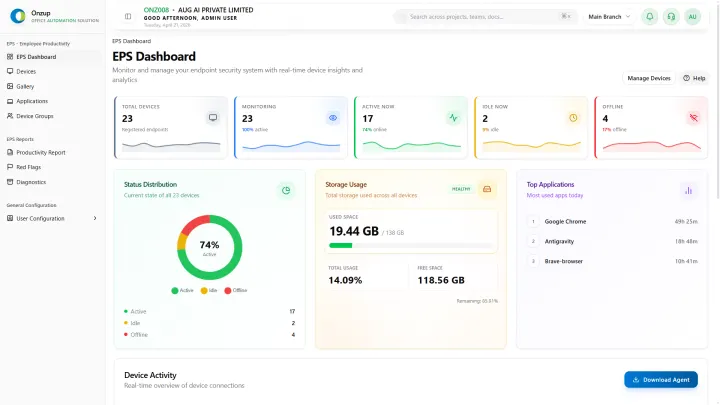
Onzup EPS dashboard preview
Dashboard views make it easier to review activity, alerts, and productivity signals in one place.
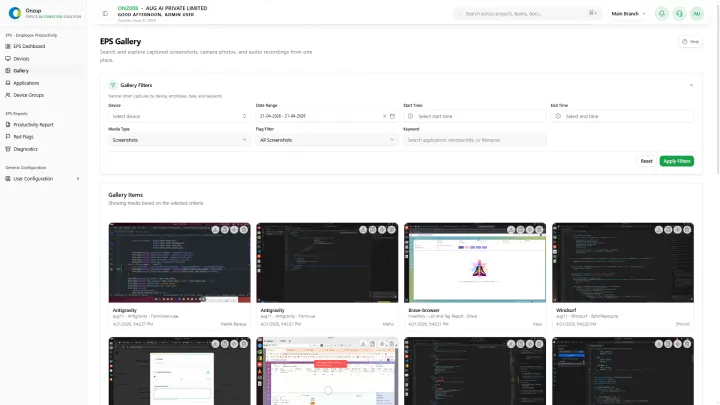
Onzup EPS app usage preview
Usage context helps managers understand what work tools are actually being used during work hours.
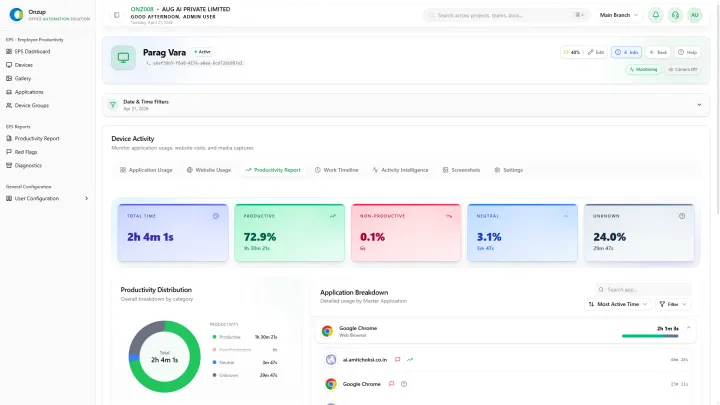
Onzup EPS productivity report preview
Export-ready reports support weekly review and governance conversations.

Customer proof

Customer proof and operational value

Weekly review cadence

1 dashboard

Managers can review productivity patterns without manually stitching together reports.

Operational context

Activity + screenshots

Reporting becomes easier to interpret when proof and trend data sit together.

Governance readiness

Exportable outputs

Leadership can use the same data for review, coaching, and escalation conversations.

FAQ

Questions readers ask before they convert

Q How does Onzup handle employee monitoring for it companies: balancing visibility and trust?

The content should explain the topic through actual product workflows, not generic promises or empty category claims.

Q Can this support weekly reviews and escalation?

Yes. The pages should connect the product to reporting, review cadence, and action-oriented workflows.

Back to top
WhatsApp chat